
arrow_backBack to stack

Cinematic Knockout Text Reveal With Your Favourite Video Editor
Create a cinematic knockout text reveal for free: generate your opening hook text, import to your video editor (CapCut, DaVinci Resolve, Premiere), add a darken blend and keyframe transition. Caption generation made easy.
Highlights
- Free asset generation, no account required
- CapCut, DaVinci Resolve, and Premiere Pro
- Darken blend and keyframed reveal in minutes
CaptionGenWizard
Tutorial
- CapCut
- DaVinci Resolve
- Premiere Pro
- Text reveal
Generate caption asset and import into your editor
Enter your opening hook text and pick an animation style (bold works well).
Generate and download—free, no account needed.
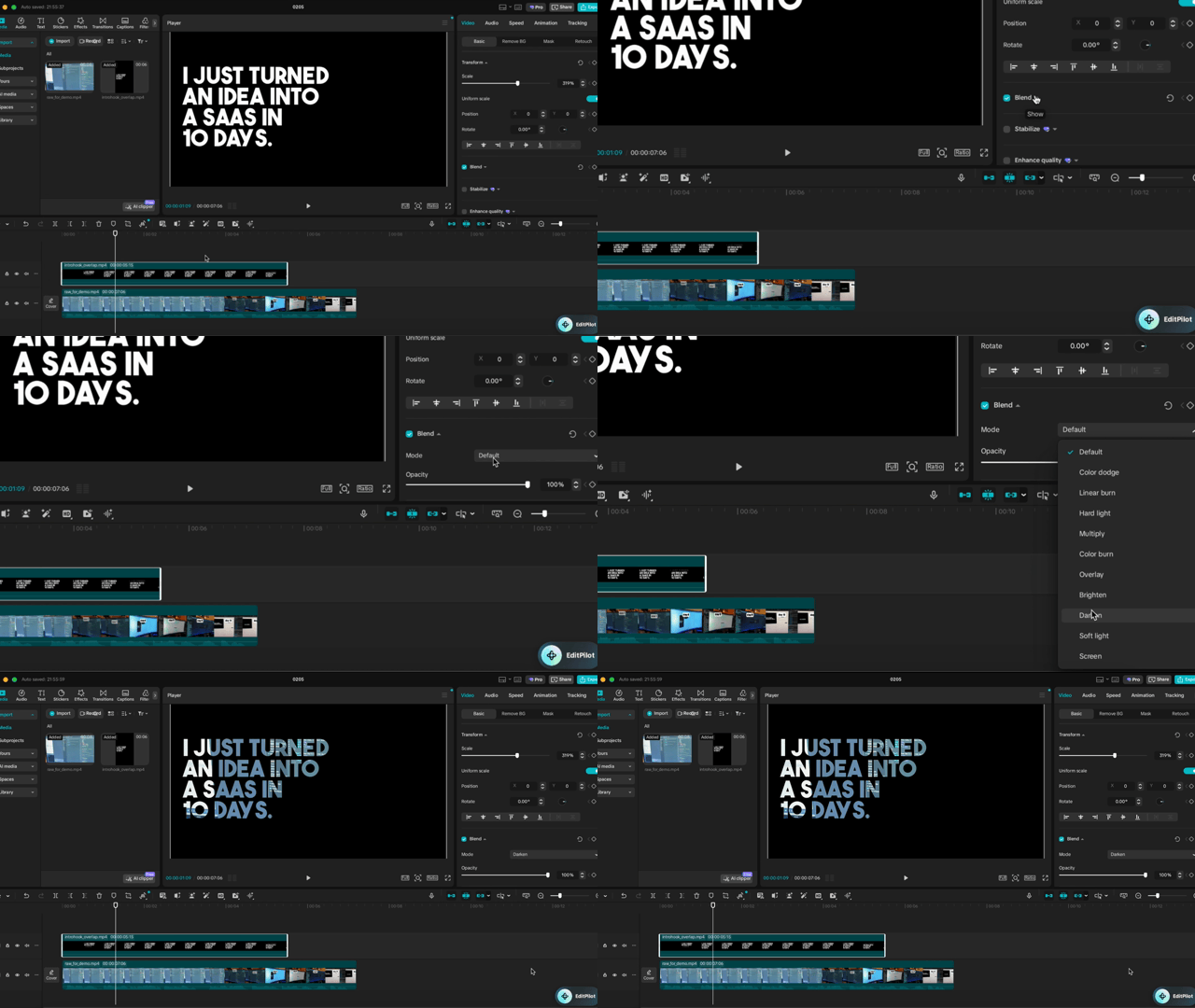
Import into CapCut, DaVinci Resolve, or Premiere Pro and place the asset on a track above your main footage.
Darken blend + keyframe transition for the reveal
On the text overlay layer, set blend mode to darken.
The letters act as a window so the main footage shows through.
Add keyframes or a transition to scale or reveal the shot for a cinematic finish.
Ideal for:
- Opening hooks and title reveals
- Social and promo clips with punchy text
- Documentary and narrative segments
- Any video editor that supports layers and masks